Pixel art for Godot
A dockable editor plugin that brings spritesynth's AI generation directly into the Godot Editor. Generate, preview, and import pixel art without switching tools.
See it in action
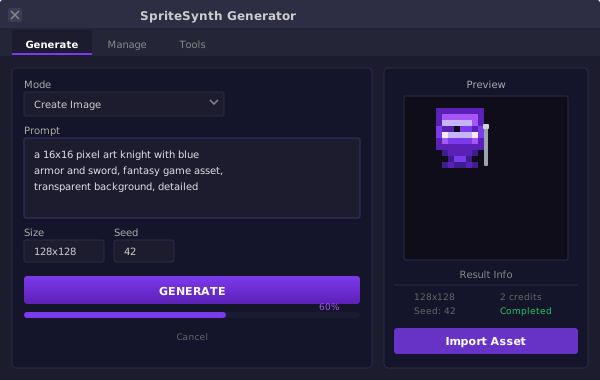
generate tab

manage tab

settings tab
What's included
Dock Panel
3-tab dock panel that integrates into Godot's UI. Switch between Generate, History, and Settings with one click.
Async Polling
4-state HTTP state machine polls the API every 2 seconds with a 10-minute timeout. Handles 402, network errors, and JSON parse failures.
Settings Manager
API key stored in ProjectSettings with SPIRESYNTH_API_KEY env var fallback. Source indicator shows where the key is coming from.
Asset Import
Generated assets are downloaded and saved to the project with proper thumbnails in the history browser.
Generation History
Scrollable history with thumbnail previews. Re-import assets, delete individual entries, or clear all history.
Connection Test
Built-in connection test that validates your API key against the spritesynth API before you start generating.
Installation
Manual Install
- Download the latest release
- Copy the
addons/spritesynth/folder into your Godot project'saddons/directory - Enable the plugin in Project > Project Settings > Plugins
- The dock appears on the left side of the Editor
Via GitHub
Clone the repository and copy the addons/spritesynth/ folder:
git clone https://github.com/magebase/spritesynth-godot.git
cp -r spritesynth-godot/addons/spritesynth your-project/addons/
API Endpoints
The plugin interacts with the spritesynth API using these endpoints:
/generations/image
Generate pixel art
/generations/{uuid}
Poll generation status
/generations/{uuid}/download
Download generated asset
Requirements
Godot 4.x or later
Free or paid spritesynth account
Connection to api.spritesynth.com
Start generating in Godot
Install the plugin and create pixel art assets without leaving the Godot Editor.