Pixel art for Unity
Generate, preview, and import AI-powered pixel art assets directly in the Unity Editor — all without leaving your project.
See it in action
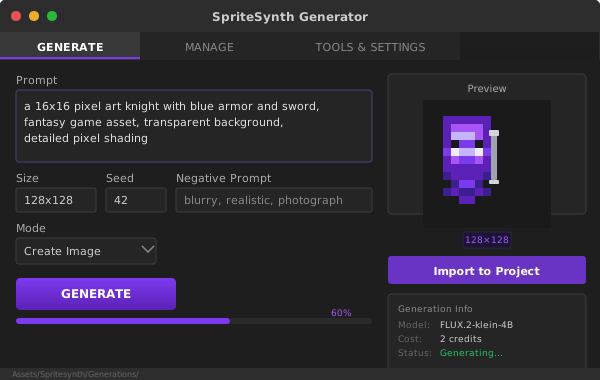
generate tab

manage tab

settings tab
What's included
Generate Tab
Write prompts, set size and seed, then generate. Watch progress in real-time and preview results before importing.
History Tab
Browse all your past generations with thumbnails. Re-import assets or delete entries you no longer need.
Settings Tab
Manage your API key with environment variable fallback, test the connection, clear history, and view version info.
Auto-Import
Generated assets are automatically saved to Assets/Spritesynth/Generations/ as point-filtered, uncompressed sprites.
Secure API Key
Keys stored in EditorPrefs with SPIRESYNTH_API_KEY environment variable fallback. Never committed to source control.
UPM Package
Install via Unity Package Manager with Git URL or OpenUPM. Compatible with Unity 2022.3 LTS and later.
Installation
Via Unity Package Manager (Git)
- Open Window > Package Manager
- Click the + button and select "Add package from git URL..."
- Enter:
https://github.com/magebase/spritesynth-unity.git - Open Tools > SpriteSynth > Generator to start
Via OpenUPM
Install the OpenUPM CLI, then run:
openupm add com.magebase.spritesynthManual .unitypackage
Clone the repo and open from disk, or download a release.
API Endpoints
The extension interacts with the spritesynth API using these endpoints:
/generations/image
Generate pixel art
/generations/{uuid}
Poll generation status
/generations/{uuid}/download
Download generated asset
Requirements
Unity LTS or later
Free or paid spritesynth account
Connection to api.spritesynth.com
Start generating in Unity
Install the extension now and create pixel art assets without leaving the Editor.